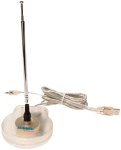
This article shows you how to record FM radio using Linux and FreeBSD. The D-Link DSB-R100 and Hauppauge WinTV GO FM are supported devices on both platforms. D-Link doesn't market the DSB-R100 anymore, but you can find them on eBay. The USB connection is used to tune the receiver frequency with ioctl()s, and a line-out plug from the unit goes into the line-in of your soundcard.
The inspiration for this project came from Gary Burd. My scripts support Python 2.4 and automatically mute the audio when recording is done.
The Linux kernel module for the D-Link is aptly named dsbr100 and is enabled in the USB section of the 2.4 kernel configuration. Be sure to enable experimental drivers under the top-level "Code maturity level options" section or you won't be able to select the driver in the USB section. You will also need to compile video4linux support (under "Multimedia Devices") into the kernel as well.
The Hauppauge WinTV GO FM PCI card will also work with Linux. Make sure to put the antenna far away from your CRT monitor and CPU power supply to minimize electromagnetic interference with the sound signal. I use gnome-volume-control to select line-in as my recording source. Setting line-in to 100% and input gain to 75% works well.
Here is fmcapture for FreeBSD using the DSB-R100 USB device. FreeBSD uses /dev/ufm0.
Recompile the FreeBSD 6.x kernel with the following line in your kernel config file:
device ufmMake the following entries in /boot/loader.conf set to YES:
usb_load="YES"                  # USB subsystem
ufm_load="YES"                  # Fm Radio
For FreeBSD 4.x, follow these instructions.
You should see /dev/ufm0 and module ufm.ko in kldstat upon rebooting with the device plugged in. At startup the device is only accessible by root, so you may need to chmod the device in a startup script if you want non-root accounts to access it, or use devfs.rules(5).
Use the mixer program to select the recording source (I use "line" instead of "mic"). The script /usr/local/etc/rc.d/mixer is supposed to save level settings across reboots, but unfortunately it will not save the recording source. I put mixer =rec line and other appropriate settings in startup script /etc/rc.local .
Some troubleshooting steps are available, as well as a userspace program to control the device.
Here is fmcapture for FreeBSD using the Hauppauge device. FreeBSD uses /dev/tuner via the bktr driver.
The bktr manpage instructs you to add the following lines to your FreeBSD 6.x kernel configuration file before rebuilding the kernel and rebooting:
device bktr
device iicbus
device iicbb
device smbus
You can set the permissions of /dev/tuner with devfs.conf(5).
There is a userspace program named tuneradio you can use to test the device (it is also available as a FreeBSD port under audio/tuneradio). I wrote a quick and dirty C program to figure out the ioctl() hex values.
Here is my crontab for recording broadcasts:
PATH=$PATH:/usr/bin:/usr/local/bin

# cartalk on saturday mornings
00  9 * * 6	fmcapture 90.5 60 /tmp/cartalk.wav

# marketplace weekdays at 6:30pm
30 18 * * 1	fmcapture 90.5 30 /tmp/marketplace.wav
30 18 * * 2	fmcapture 90.5 30 /tmp/marketplace.wav
30 18 * * 3	fmcapture 90.5 30 /tmp/marketplace.wav
30 18 * * 4	fmcapture 90.5 30 /tmp/marketplace.wav
30 18 * * 5	fmcapture 90.5 30 /tmp/marketplace.wav
01 19 * * 1	lame --silent -h /tmp/marketplace.wav /tmp/marketplace/market-01.mp3
01 19 * * 2	lame --silent -h /tmp/marketplace.wav /tmp/marketplace/market-02.mp3
01 19 * * 3	lame --silent -h /tmp/marketplace.wav /tmp/marketplace/market-03.mp3
01 19 * * 4	lame --silent -h /tmp/marketplace.wav /tmp/marketplace/market-04.mp3
01 19 * * 5	lame --silent -h /tmp/marketplace.wav /tmp/marketplace/market-05.mp3

# paul ray's jazz on tuesday and wednesday evenings
00 20 * * 2	fmcapture 90.5 180 /tmp/paulray.wav
00 20 * * 3	fmcapture 90.5 180 /tmp/paulray.wav
00 04 * * 3	flac -s -o /music/paulray/paulray1.flac /tmp/paulray.wav
00 04 * * 4	flac -s -o /music/paulray/paulray2.flac /tmp/paulray.wav
I do not compress the wav file because different recorded programs have different destinations:
#!/bin/sh

CDRECORD_OPTS="-v dev=0,0,0 gracetime=2 speed=16"

# blank a CR-RW
if [ $1 = "blank" ]
then
        cdrecord $CDRECORD_OPTS blank=fast
        exit
fi
The first thing I do is setup a global variable to describe my CDRW drive's SCSI emulation information, as well as a command line option to manually blank a CDRW. Later in the script I'll assume that the CD is a CDRW and blank it. Even if that's not the case and the media really is a CDR, the "blank" command will fail but the script will keep going.
# cartalk
if [ $1 = "cartalk" ]
then
        cdrecord $CDRECORD_OPTS blank=fast
	cd /tmp
	wavsplit /tmp/cartalk.wav 19:30 39:30
	cdrecord $CDRECORD_OPTS -raw -pad -audio /tmp/cartalk/*.wav
        exit
fi
wavsplit is a
program to split wav files into sections.
I found wavsplit 1.0 to be
rather buggy, so I created my own patch [sourceforge
mirror] to make it work.
The above example shows splitting the Car Talk
recording into three different wav files. I can then use my car
stereo to navigate to the start of each segment as needed.
The segment offset times match the start of the
show's three segments perfectly every week. I guess my local radio station must
be using the same NTP server as me!
# marketplace
if [ $1 = "marketplace" ]
then
        cdrecord $CDRECORD_OPTS blank=fast
	cd /tmp
	mkisofs -U -o marketplace.iso marketplace/
	cdrecord $CDRECORD_OPTS marketplace.iso
	exit
fi
The above section creates an ISO image of all the MP3-encoded episodes
of Marketplace for the week and burns them to CDRW. Since I'm
time-shifting, you can tell that I care more about the cheeky business
stories than the rise and fall of the market that day.
# EVERYTHING ELSE
# following line for redhat 9.0 kernel
cdrecord $CDRECORD_OPTS -raw -pad -audio $*
The last part of the program lets me manually record other wav files to CD if I need to.
And there you have it. Happy time shifting!